Hide header in previews removes Alloy interface chrome from a shared prototype link so viewers can focus on the experience being demonstrated.
Send a preview link that's just your UI, nothing else.
When you share an Alloy session, viewers normally see a small header above it with the session name and controls. That's useful for collaborators, but for stakeholder demos and customer walkthroughs, you often want your app's UI to fill the screen on its own.
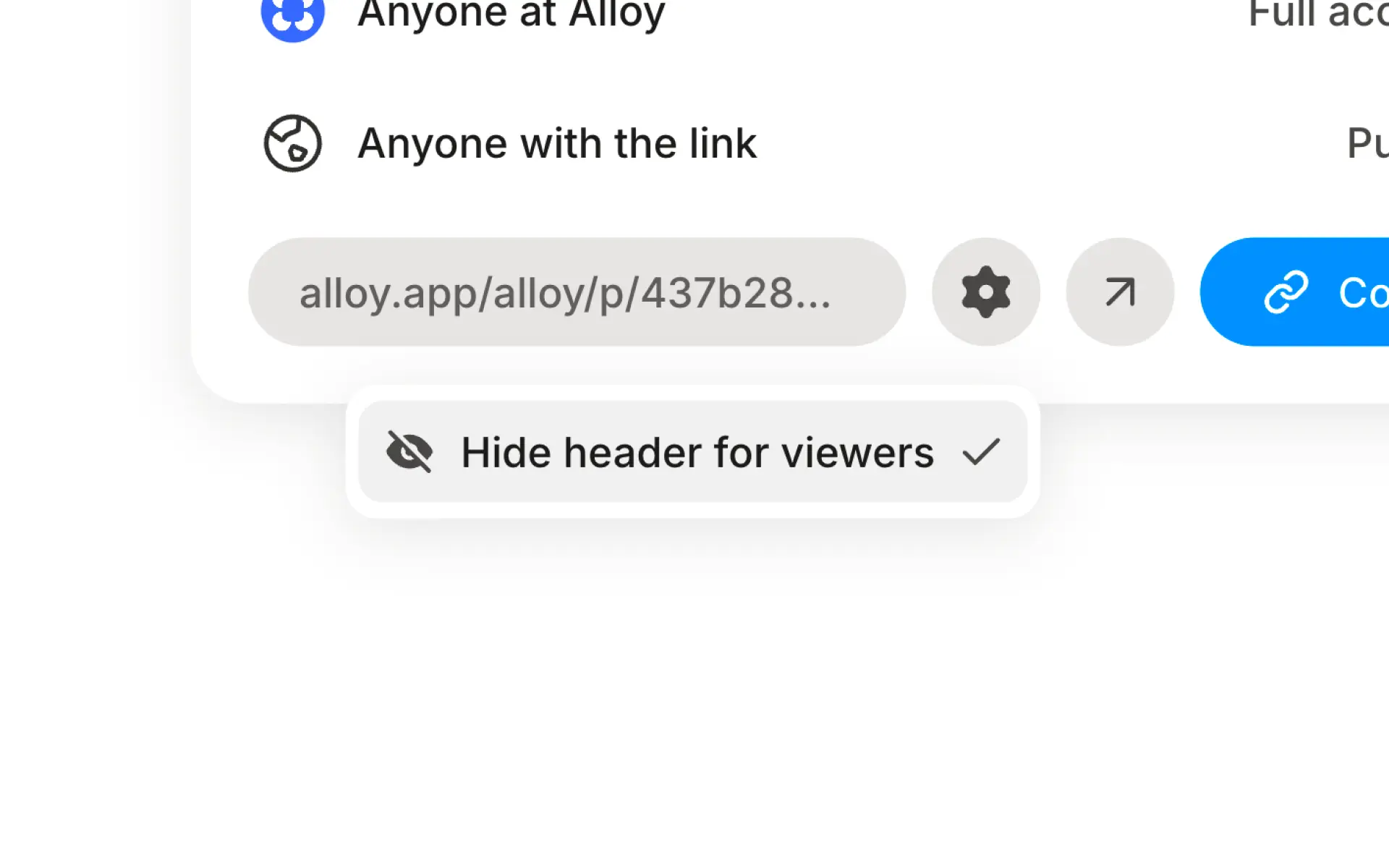
To solve for this, you can now hide the header from anyone who opens your share link. Open the share dialog, click the settings icon next to the link, and toggle "Hide header for viewers". The link stays the same — viewers just see a cleaner, focused view with just your app UI.
Available today from the share dialog.
Frequently asked questions
Use a presentation-style share link that hides the prototyping tool's navigation and controls. In Alloy, open Share and turn off Show header before sending the link to stakeholders or customers.
Yes, removing surrounding interface chrome creates a cleaner, more immersive walkthrough. Alloy's header toggle keeps the shared prototype interactive while presenting only the experience you want the viewer to see.
No, a presentation setting should change only what viewers see around the experience, not the prototype itself. Alloy's Show header toggle applies to the shared preview so the underlying prototype remains unchanged.