Low-fidelity prototypes simplify detail so teams can explore structure and direction quickly. High-fidelity prototypes reproduce the visual, content, interaction, data, or technical details needed for realistic evaluation. Fidelity is a continuum, not a quality score. Choose the lowest level that makes the current risk observable, then add realism only when it changes the evidence you can collect.
Key takeaways:
- Fidelity spans visuals, content, interaction, data, and technical behavior.
- A prototype can be high fidelity in one dimension and low fidelity in another.
- Low fidelity supports fast structural learning and visible incompleteness.
- High fidelity supports realistic tasks but can create false expectations of readiness.
- The right fidelity is the minimum realism required for the next decision.
Low Fidelity vs. High Fidelity at a Glance
| Dimension | Low fidelity | High fidelity |
|---|---|---|
| Main goal | Explore direction and structure | Evaluate realistic experience |
| Visual treatment | Simplified or schematic | Close to intended interface where relevant |
| Content | Placeholder or representative | Realistic, contextual, and edge-aware |
| Interaction | Limited, manual, or simulated | Detailed states and believable responses |
| Data | Static examples | Realistic scenarios or controlled test data |
| Effort to change | Usually low | Usually higher |
| Feedback encouraged | Concept, hierarchy, sequence | Comprehension, behavior, trust, detailed usability |
| Main risk | Missing an issue caused by realism | Overinvestment or false production expectations |
The table describes common patterns, not two fixed packages. A hand-drawn flow can contain accurate domain content. A polished screen can contain fake interactions. Evaluate each fidelity dimension separately.
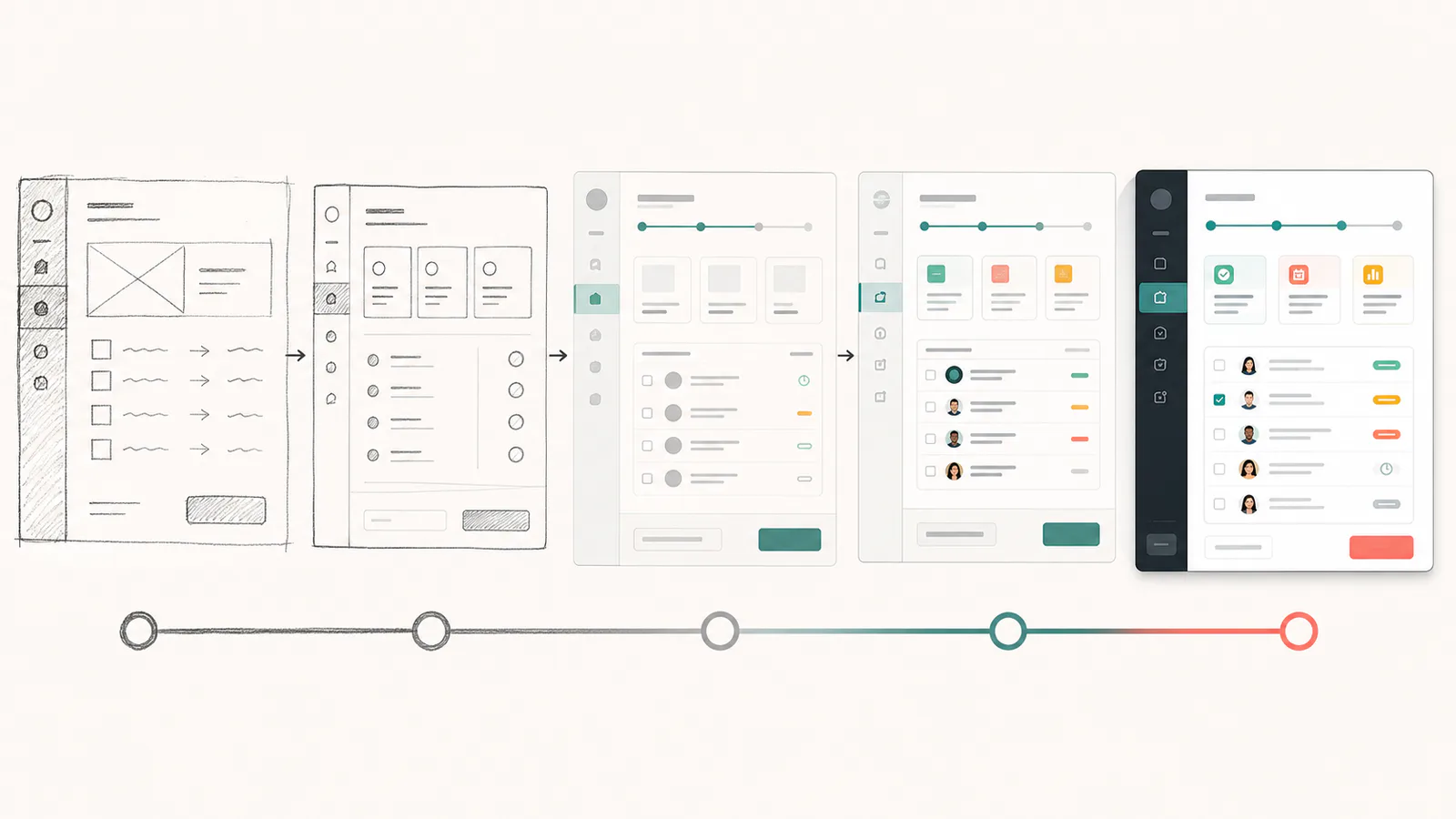
Fidelity Is a Continuum, Not a Binary Choice
The Interaction Design Foundation's overview of low-fidelity prototypes describes them as simple, incomplete representations used to test ideas, concepts, and requirements early. "Simple" should not be confused with careless. A good low-fidelity prototype is precise about the question and intentionally incomplete elsewhere.
Instead of assigning one fidelity label to an entire prototype, rate the dimensions that affect the test:
| Fidelity dimension | Low end | High end |
|---|---|---|
| Visual | Boxes, basic hierarchy | Intended typography, spacing, color, and components |
| Content | Labels and placeholders | Realistic language, values, lengths, and edge cases |
| Interaction | Described or manually advanced | Detailed controls, states, transitions, and recovery |
| Data | One static scenario | Multiple realistic states with controlled test data |
| Technical | Simulated response | Representative integrations or isolated application logic |
| Context | Standalone screen | Real entry point, navigation, permissions, and next steps |
A pricing prototype may need high-fidelity content and calculations but only medium visual fidelity. A motion study may need high interaction fidelity but use generic content. A concept test may need little detail in any dimension.
When Low-Fidelity Prototypes Work Best
Low-fidelity prototypes are valuable when the team is still deciding what the experience should be. They make alternatives inexpensive to create and visibly signal that the work is open to change.
Use lower fidelity to explore:
- Information hierarchy and page structure
- Navigation and task sequence
- Competing concepts or layouts
- Scope boundaries
- Early terminology and content grouping
- Whether a proposed capability belongs in the workflow at all
Low fidelity also reduces the amount of accidental detail reviewers can debate. When color, component polish, and animation are absent, the team can focus on whether the information and actions are in the right place.
That does not make low fidelity neutral. Placeholder content can hide comprehension problems. A rough sketch may cause participants to assume missing behavior that the product team never intended. Explain the prototype's limits and avoid drawing conclusions about dimensions it does not represent.
When High-Fidelity Prototypes Work Best
Higher fidelity is useful when realism changes how people understand or use the experience. Increase fidelity when the research question depends on:
- Visual hierarchy, readability, or brand trust
- Real content, terminology, prices, dates, or quantities
- Detailed form behavior and validation
- Loading, empty, error, permission, and success states
- Responsive layouts or assistive technology
- Multi-step context and realistic entry points
- A complex interaction that is difficult to imagine from static screens
For a mature web app, surrounding context can matter as much as the changed component. A realistic page inside a generic shell may still produce misleading behavior if participants cannot find it through the product's normal navigation.
Starting from the existing application can supply much of this fidelity without rebuilding the interface. The guide to prototyping changes in an existing web app explains how to capture or isolate the current product while keeping the experiment separate from production.
Choose Fidelity With a Decision Matrix
Start with the research question, then identify which dimensions must be credible for someone to answer it.
| Research question | Recommended starting fidelity | Why |
|---|---|---|
| Does the page contain the right information? | Low visual, representative content | Structure matters more than polish |
| Can users find the feature in the current app? | High context, medium visual and interaction | Entry point and navigation must feel real |
| Do users understand a billing change? | High content and state fidelity | Prices, timing, and consequences shape the decision |
| Which of three concepts should we explore? | Low across most dimensions | Cheap variation is more valuable than detail |
| Can keyboard users complete the flow? | High interaction and technical fidelity | Focus order and control behavior must be operable |
| Will stakeholders support the visual direction? | High visual, representative content | Appearance is the subject of review |
| Can engineering implement a risky interaction? | Technical spike rather than visual polish | Feasibility requires representative code or systems |
The matrix is a starting point. If a participant cannot act because the prototype omits a critical dimension, raise that fidelity before drawing conclusions. If the team is discussing polish while the concept remains uncertain, lower fidelity or narrow the review prompt.
How Fidelity Changes Feedback
Prototype fidelity influences what reviewers notice and what they assume is decided. Rough work can invite broad suggestions but require more explanation. Polished work can support realistic tasks while making people reluctant to challenge the underlying concept.
The peer-reviewed study Prototyping for context examined how prototype type, stakeholder group, and question type influenced feedback in a medical-device setting. Its results should not be generalized to every digital product, but the research reinforces a practical principle: feedback depends on the artifact, the audience, and the questions asked.
Manage that effect explicitly:
- State what the prototype represents and what remains unresolved.
- Ask questions connected to the participant's knowledge and the research goal.
- Separate feedback about the concept, structure, visuals, and behavior.
- Record where prototype limitations affected the session.
- Do not interpret silence about an unrepresented state as validation.
The companion guide explains how to test prototypes with users, including neutral tasks, observation, accessibility, and limits on qualitative conclusions.
Accessibility Can Require More Than Visual Fidelity
A screen can look identical to the intended product while remaining low fidelity for keyboard, screen-reader, zoom, motion, or input behavior. Visual similarity is not evidence of accessibility.
If accessibility is part of the question, the prototype needs representative semantics and interaction behavior. Test focus order, labels, error association, responsive reflow, contrast, zoom, and relevant assistive technologies. Document any behavior the prototype cannot represent.
The W3C Web Accessibility Initiative recommends combining evaluation with users and standards-based assessment. It also cautions against treating the experience of one disabled participant as representative of everyone with a similar disability.
Use lower-fidelity artifacts to involve disabled users in early structure and content decisions, then increase technical and interaction fidelity before evaluating operability.
Avoid False Expectations With High-Fidelity Work
High-fidelity prototypes can look finished while relying on simulated data, hard-coded paths, or incomplete states. Tell reviewers exactly what is real.
Before sharing, disclose:
- Which interactions work and which are simulated
- Whether data is synthetic, static, or connected to a test service
- Which roles, devices, and states are represented
- Known accessibility limitations
- What has not received engineering, security, legal, or policy review
- Whether any code is intended for reuse
Do not describe a visually realistic prototype as "almost shipped." Production software needs reliability, security, observability, data handling, migration, support, and maintainable implementation that a prototype may intentionally omit.
When to Increase or Reduce Fidelity
Increase fidelity when lower-detail testing has stabilized the concept and the remaining risk depends on realism. Add one relevant dimension at a time where practical. Replace placeholder content before evaluating comprehension. Add error states before evaluating recovery. Add real navigation before evaluating discovery.
Reduce fidelity when the team needs to reopen the structure, compare more directions, or challenge an assumption that polish has made expensive to question. Moving back to sketches is not regression. It is a deliberate change in the cost of exploration.
AI prototyping makes it easier to generate detailed interfaces early, but generation speed does not make every detail useful. Start from the decision, preserve the context that shapes behavior, and remove realism that does not affect the evidence.
Common Fidelity Mistakes
- Equating fidelity with quality: More detail can produce less useful feedback when the question is broad.
- Judging the whole prototype with one label: Visual and behavioral fidelity can differ substantially.
- Using placeholder content for a comprehension test: The missing content is part of the experience.
- Testing accessibility from screenshots: Operability requires representative semantics and behavior.
- Letting polish imply commitment: Reviewers need to know what remains open.
- Turning a prototype into unreviewed production code: Similar appearance does not establish production readiness.
FAQs
What makes a prototype high fidelity?
A high-fidelity prototype represents the dimensions that matter to the test with substantial realism, such as visual design, content, interaction states, data, or system behavior. It does not need production code, and visual polish alone does not make behavior high fidelity.
Which prototype fidelity is best for user testing?
Use the lowest fidelity that allows realistic behavior for the research question. Choose low fidelity for structure, sequence, and early concept learning; increase fidelity when visual hierarchy, content, trust, accessibility, complex interactions, or the surrounding product affect the result.
When should a team move from low to high fidelity?
Increase fidelity when evidence shows the core concept and structure are stable enough that remaining uncertainty depends on realism. Add only the dimensions needed for the next question, and return to lower fidelity if the team needs to reconsider the underlying flow.
Can an existing product be the starting point for a high-fidelity prototype?
Yes. Capturing or isolating the existing interface can provide realistic components, terminology, and surrounding context immediately. The team should still limit the prototype to the hypothesis, use safe test data, and avoid implying that visual similarity means the change is production-ready.
Use Enough Realism to Learn, Then Stop
Fidelity is a research input, not a progress bar. Make the dimensions that affect the decision realistic and keep the rest easy to change. That approach produces credible evidence without letting detail outrun what the team actually knows.