
A wireframe shows how information and controls are arranged, a mockup shows how the interface is intended to look, and a prototype lets people experience how it behaves. These artifacts can overlap, and none has a mandatory place in every project. Choose one by the question the team needs to answer, not by a fixed design-process checklist.
Key takeaways:
- Wireframes prioritize structure, hierarchy, and flow.
- Mockups prioritize visual design, content treatment, and brand expression.
- Prototypes prioritize behavior, interaction, and learning through use.
- Fidelity is separate from artifact type: a prototype can be rough or highly realistic.
- Teams can skip, combine, or revisit artifacts as product risk changes.
Wireframe vs. Mockup vs. Prototype at a Glance
| Dimension | Wireframe | Mockup | Prototype |
|---|---|---|---|
| Primary purpose | Define structure and hierarchy | Define visual treatment | Test behavior and experience |
| Typical interactivity | None or simple linked screens | Usually static | Interactive or behaviorally simulated |
| Typical fidelity | Low to medium | Medium to high visually | Any level |
| Content | Placeholder or representative | Realistic or near-final | Realistic enough for the task |
| Main feedback | Layout, priority, navigation | Visual clarity, brand, content | Comprehension, interaction, task success |
| Relative effort | Usually low | Medium | Varies with behavior and realism |
| Useful stage | Early framing and flow work | Visual direction and review | Any stage with a testable question |
These are working distinctions, not universal laws. Design teams sometimes use the same file as a wireframe and a simple prototype. The name matters less than making the artifact's purpose and limitations clear to everyone reviewing it.
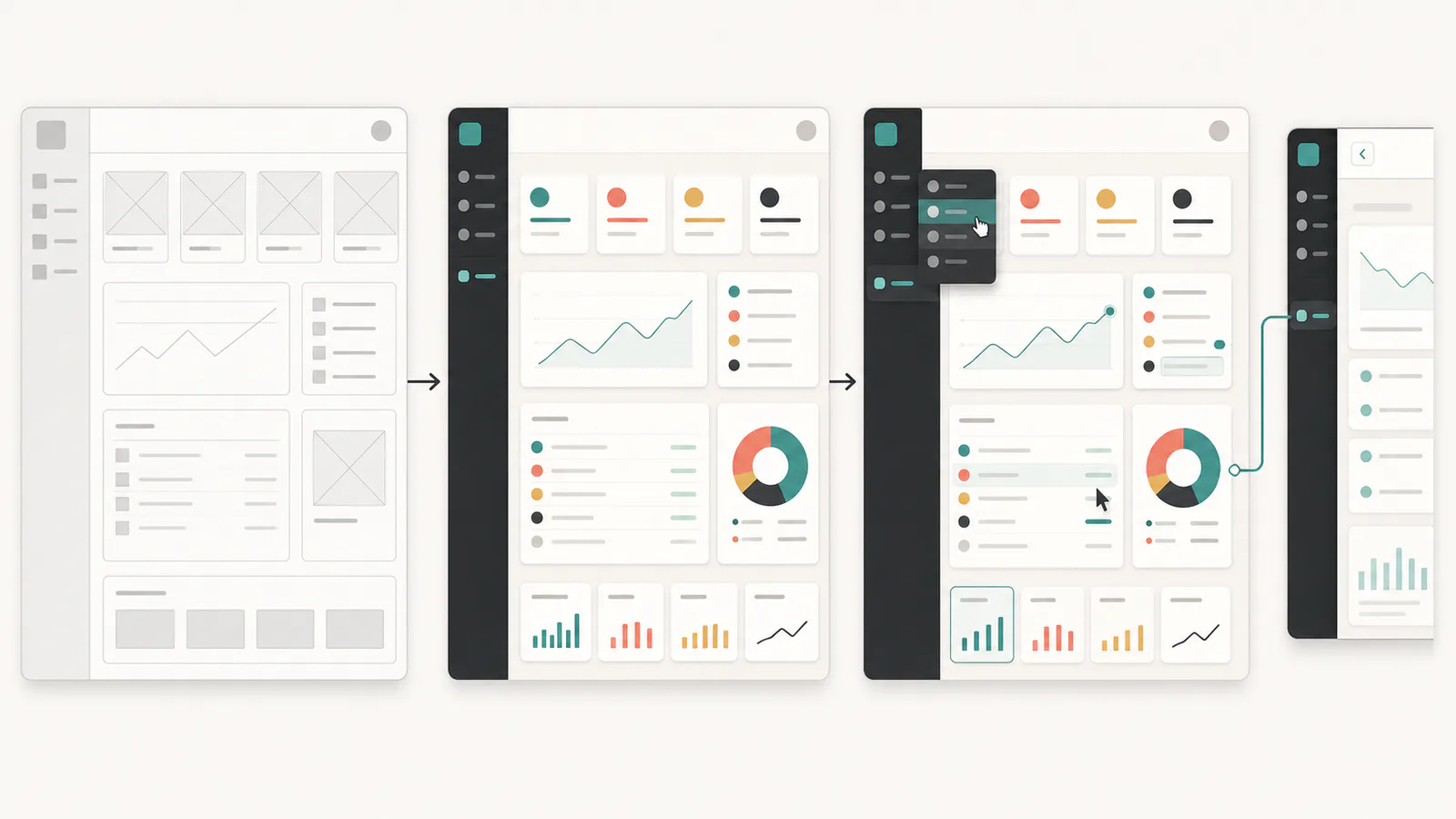
What Is a Wireframe?
A wireframe is a simplified representation of a page or screen that communicates structure. It shows where navigation, content, controls, and supporting information belong without requiring the team to resolve every visual detail.
Digital wireframing software helps teams create and compare these structural options before investing in visual polish or production code.
Figma describes a wireframe as a low-fidelity blueprint for layout and user flow. In practice, wireframes range from hand-drawn sketches to tidy digital screens. What makes the artifact a wireframe is its structural purpose, not whether the lines are perfectly straight.
A useful wireframe can answer questions such as:
- Which information should appear first?
- Can a user find the primary action?
- How many steps does the flow require?
- What belongs in navigation versus page content?
- Does the layout still make sense at a narrow viewport?
Wireframes deliberately postpone some decisions. Grayscale boxes prevent brand color from dominating a conversation about hierarchy. Placeholder images keep attention on placement. Simplified components make rearranging a flow inexpensive.
When to use a wireframe
Use a wireframe when the team is still negotiating information architecture, page hierarchy, or the sequence of a task. It is especially helpful when several approaches deserve comparison and detailed visual work would make each option unnecessarily expensive.
Do not use a wireframe to judge trust, final readability, brand fit, detailed interaction, or emotional response. The missing content and visual treatment may be exactly what shapes those outcomes.
What Is a Mockup?
A mockup is a primarily static representation of the intended visual interface. It applies typography, color, spacing, imagery, components, and realistic content to show how a finished screen should look.
Miro's wireframe and mockup guide distinguishes the artifacts by focus: wireframes communicate structure, while mockups communicate visual design. A mockup may look highly polished without supporting a complete task.
Mockups can answer questions such as:
- Does the visual hierarchy direct attention correctly?
- Does the interface align with the design system?
- Are content density and line lengths manageable?
- Do error, warning, and success treatments remain distinguishable?
- Does the proposed screen fit the visual language of the product?
Realistic content matters. A settings page filled with repeated placeholder text may look balanced while failing with actual plan names, dates, prices, or translated labels. Use representative content early enough to expose layout problems.
When to use a mockup
Use a mockup when visual treatment is itself a decision, when stakeholders need to review brand or content hierarchy, or when engineering needs a reference for appearance. A mockup is also useful as one state within a larger prototype.
Do not treat approval of a static mockup as evidence that the workflow is usable. People can understand a screen in a presentation and still fail to complete the task when controls, transitions, and system feedback are involved.
What Is a Prototype?
A prototype is an interactive or behaviorally simulated representation used to explore and test how an experience works. It can be a paper interaction, linked wireframes, a high-fidelity browser experience, or an isolated implementation built from a real application.
Prototypes can answer questions such as:
- Can users complete the intended task?
- Do they understand what happened after an action?
- Can they recover from an error?
- Does a multi-step flow preserve context?
- Are interaction states and transitions sufficient?
- Does the concept work inside the surrounding product?
A prototype does not have to contain production code or every feature. It needs enough behavior and context for the chosen test. The guide to testing a prototype with users explains how to turn an interactive artifact into useful evidence.
When to use a prototype
Use a prototype whenever behavior is part of the uncertainty. That can happen before visual design, during refinement, or after a product already exists. A product team considering a new permission flow may need to test discovery, confirmation, error recovery, and the updated state. A static screen cannot reveal that sequence.
For an established product, the most efficient prototype may begin with the current interface. Prototyping a change in an existing web app preserves familiar context while isolating the experiment from production.
Artifact Type and Fidelity Are Different Decisions
Teams often use "prototype" to mean a polished clickable design and "wireframe" to mean a rough static design. That shorthand hides two separate questions:
- What kind of artifact is this? Structure, visual direction, or interactive experience?
- How realistic does it need to be? Rough, representative, or close to the final product?
A wireframe can be connected into a clickable prototype. A mockup can represent one high-fidelity state inside a prototype. A prototype can be made from index cards with almost no visual fidelity.
The low-fidelity versus high-fidelity prototype guide treats realism as a continuum across visuals, content, interaction, data, and technical behavior. Keep that decision separate from the artifact's purpose.
Do You Need to Create All Three?
No. A sequence of wireframe, mockup, then prototype can be useful, but it is not a maturity ladder every project must climb.
Use the fastest path to credible evidence:
| Current uncertainty | Useful next artifact |
|---|---|
| Page hierarchy is unclear | Wireframe alternatives |
| Visual direction or content treatment is unclear | Mockup with realistic content |
| Navigation or task behavior is unclear | Interactive prototype |
| Existing workflow needs a small change | Prototype based on the current product |
| Team needs to compare structure and behavior | Clickable wireframes |
| Direction is validated and implementation details remain | Engineering spike or reviewed implementation |
Skipping an artifact is sensible when its questions are already answered. Skipping the question is not. If the team moves directly into a polished prototype, confirm that structure and scope were deliberate rather than inherited from the first generated result.
How AI Changes the Prototyping Sequence
AI prototyping reduces the mechanical effort required to create screens and interactions. That can let teams explore realistic behavior earlier, but faster generation does not remove the need to state what is being tested.
Prompt-to-interface tools often produce visual treatment, structure, and interactions at the same time. Review those dimensions separately. A polished output can still have weak information architecture, invented content, missing states, or behavior that does not match the existing product.
The broader AI guide for product managers places prototyping alongside research synthesis, planning, and communication. Whatever the workflow, the artifact still needs a defined purpose and a clear review question.
For teams with a live product, capturing the current page can replace the work of reconstructing a separate mockup before prototyping a change. The team still needs to define the hypothesis, decide what fidelity matters, test the affected flow, and review any resulting code before release.
Common Classification Mistakes
- Calling every design a prototype: Static visual review does not test behavior.
- Calling every grayscale screen a wireframe: Color does not determine purpose.
- Assuming prototypes are high fidelity: Paper and linked wireframes can both prototype an interaction.
- Treating a mockup as an implementation contract: It may omit responsive, accessibility, data, and error requirements.
- Treating a prototype as an MVP: Simulated behavior is not production reliability.
- Following a fixed sequence without a question: Artifacts become deliverables instead of learning tools.
FAQs
What is the difference between a wireframe, mockup, and prototype?
A wireframe communicates structure and information hierarchy, a mockup communicates the intended visual design, and a prototype lets people experience or test behavior. Fidelity can vary within each category, so purpose and interactivity are more reliable distinctions than visual polish alone.
Can a wireframe be interactive?
Yes. Teams often connect wireframe screens into a clickable flow to test navigation or sequence. It remains a wireframe when its primary purpose is to communicate structure with intentionally simplified content and visual design, even though it also behaves as a basic prototype.
Do product teams need to create all three artifacts?
No. Create only the artifact needed to answer the current question. A team may move from sketches directly to an interactive prototype, use a mockup without testing behavior, or prototype an existing interface without producing separate wireframes first.
Is a prototype the same as an MVP?
No. A prototype is an experiment used to learn about a concept, flow, or interaction and can contain simulated behavior. An MVP is a released product intended to deliver value to real users, so it requires production-level reliability, security, data handling, and support.
Choose the Artifact by the Question
Wireframes, mockups, and prototypes are tools for different conversations. Name the uncertainty first, then create the least expensive artifact that makes that uncertainty observable. The team may need one artifact, a combination, or a return to an earlier form after new evidence changes the problem.
