
The difference between a prototype that gets useful feedback and one that doesn't comes down to fidelity. Generic wireframes make stakeholders guess. Demos built with your actual AI prototyping workflow and real components let them react to something that feels finished. You're not spending days in Figma anymore. You're prompting, iterating, and sharing clickable flows in hours. The process has become repeatable enough that it's worth learning the steps, especially if you're trying to move faster than your competition without sacrificing quality or burning out your design team.
TLDR:
- You can go from rough concept to shareable demo in hours using prompt-driven prototyping.
- Over 58% of PMs now use AI prototyping for concept validation and stakeholder alignment.
- Specific prompts anchored to your design system cut revision cycles and prevent generic output.
- Cloud environments let designers, PMs, and engineers work from the same artifact without local setup.
- The right tool builds prototypes using your actual components and design system for on-brand demos.
What AI Prototyping Actually Means in 2026
AI prototyping in 2026 means generating interactive, high-fidelity demos from a prompt or rough sketch, not spending days in Figma before a single stakeholder sees your idea. The gap between concept and clickable prototype has collapsed. Teams now expect to go from idea to shareable demo in hours, and the workflow behind that speed has become a real discipline worth understanding. Whether you're a product manager, designer, or founder, knowing how this process works gives you a meaningful edge in how fast you can learn and ship. AI prototyping tools for PMs have evolved to support this speed, with AI reshaping UX workflows across the industry.
Choosing Your AI Prototyping Approach
Before picking a tool, it helps to understand the three broad approaches to AI prototyping and what each one actually requires from you.
| Approach | Best For | Skill Required | Typical Output |
|---|---|---|---|
| Chatbots and AI assistants | Ideation, flow mapping, rough concepts | None | Text descriptions, static mockups |
| Cloud development environments | Team demos, high-fidelity prototypes, collaborative review | Low to medium | Interactive, shareable sessions |
| Local developer assistants | Custom components, code-first iteration | Developer | Functional code, working components |
The design-first versus code-first split runs through all three. Chatbots favor conceptual thinking but produce low-fidelity output. Local tools favor code-first but require setup and often limit who on your team can participate. Cloud environments sit in the middle, letting designers, PMs, and engineers work from the same artifact without anyone needing a local dev environment configured and running.
Starting With Context: Before You Prompt
The quality of AI output depends almost entirely on what you put in first. Skipping prep is the fastest way to spend an hour cycling through bad iterations when a solid brief would have gotten you there on the first try.
Before opening any tool, write down:
- What the feature or flow actually does and the problem it solves for the user
- Who it's for and what they need to accomplish in that specific context
- Constraints like existing components, spacing rules, or screen sizes
- Reference screenshots that capture the visual style you're working within
User flows are worth the extra few minutes. Even a rough sketch of step A to step B gives the AI enough structure to produce something useful instead of generic output. The more specific your setup, the fewer revision cycles you burn getting there.
Converting Designs Into Working Prototypes
Once a design takes shape, the next step is bringing it to life without weeks of engineering work. AI prototyping tools now interpret design files, map out interaction logic, and generate clickable flows automatically. What used to require a developer handoff can happen in minutes, giving teams a working demo before a single line of production code is written.
This speed matters because stakeholder feedback is most useful early. Getting a functional prototype in front of decision-makers while ideas are still flexible saves costly revision cycles down the road and helps teams test ideas before committing engineering resources. Best practices for real-time feedback in prototyping point to early sharing as the single biggest driver of useful input.
Building Prototypes from Scratch with Prompts
Prompt-driven prototyping has become one of the fastest ways to go from a rough concept to something you can actually click through. Instead of spending hours in a design tool placing components by hand, you describe what you want and let AI generate the initial structure.

The key is being specific. Vague prompts produce generic results. When you include details like user role, core action, and expected output, the generated prototype reflects real product thinking instead of a generic wireframe.
- Describe the screen's job before its appearance: lead with what the user needs to accomplish on that screen, then layer in layout or visual preferences.
- Iterate in short cycles: generate, review, refine with a follow-up prompt instead of trying to get everything right in one pass. Tools for rapid product iteration make this cycle faster.
- Anchor prompts to your design system: referencing your actual component names can help keep generated screens more consistent with your existing product.
The Iterative Refinement Loop
The first output sets a baseline, not a finish line. Refinement works best in passes: fix layout and content hierarchy first, then interaction logic, then edge cases. Trying to resolve everything at once is how iterations stall.
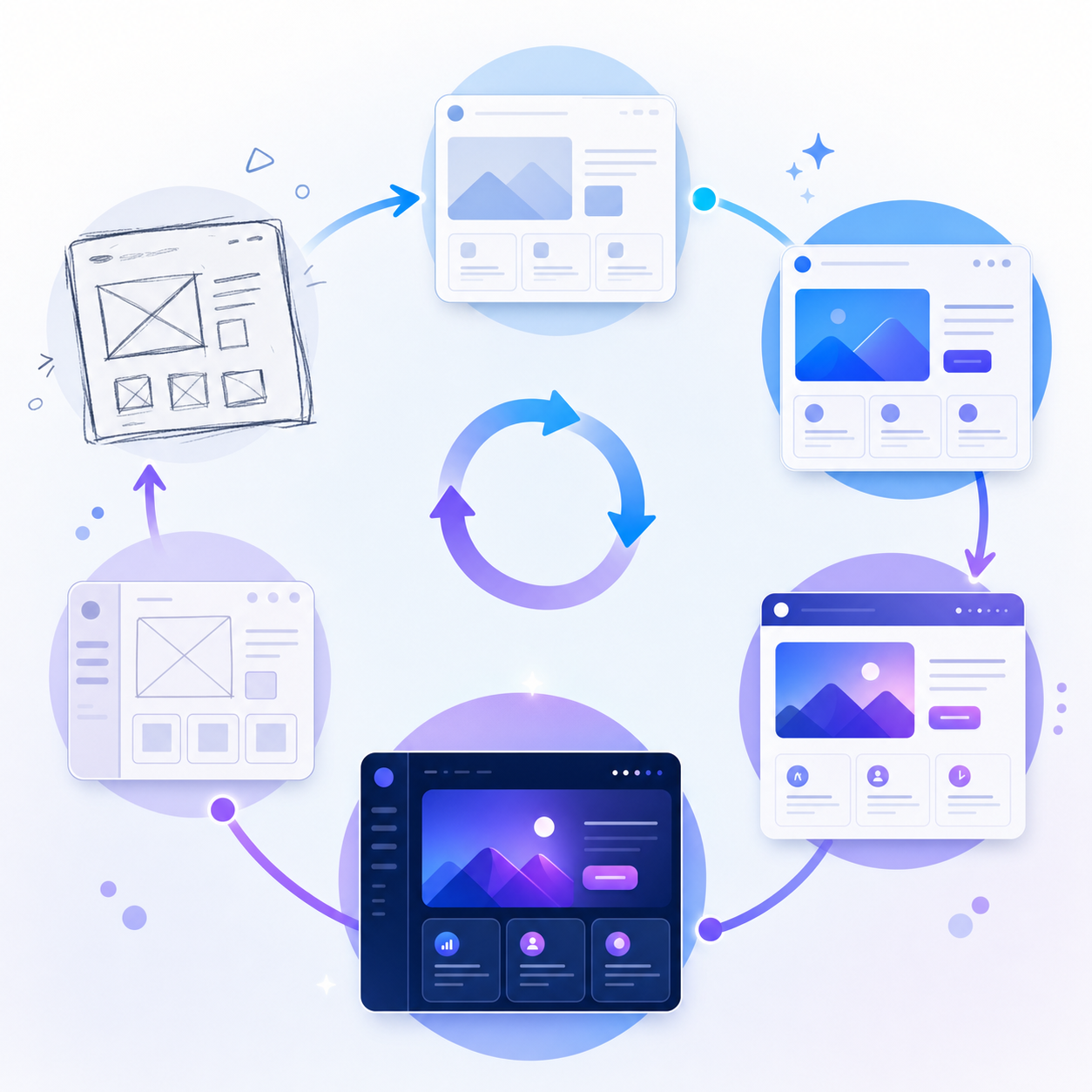
A prototype is ready for user testing when it answers the original question you started with. Not when every detail is resolved. Chasing polish before anyone has seen the prototype is a trap AI makes surprisingly easy to fall into, because tweaking feels productive and costs almost nothing. Effective prototype testing methods help you validate designs before committing to development.
That cost asymmetry is what separates AI prototyping from traditional methods. A wrong direction used to mean a lost day. Now it means a follow-up prompt. Tools for prototyping on existing web apps take this speed even further.
When AI Prototyping Works Best
Over 58% of PMs now use no-code prototyping platforms or AI prototyping generators. Research on AI prototyping for product managers confirms the scenarios where it pays off follow a clear pattern:
- Early concept validation before anyone commits to a direction
- Stakeholder alignment without waiting on design or engineering cycles
- User testing interaction flows before engineering investment
- Testing two or three alternative approaches in a single session
Where it struggles: highly custom interaction logic, strict accessibility requirements from day one, or prototypes expected to graduate directly into production code. In those situations, the time spent correcting AI output can exceed just building it right the first time.
Design Knowledge Still Matters
AI amplifies judgment. Teams with even a basic grasp of hierarchy, spacing, and user flow write sharper prompts and spot weak output faster. That foundational understanding helps inform better AI prompts. You don't need to be a Figma expert, but knowing why a layout feels off makes each iteration more productive than the last.
Common Limitations and How to Work Around Them
Even the best AI prototyping workflows run into friction points. Knowing where things tend to break down helps you move faster when they do.
- AI-generated layouts often miss brand-specific details like custom spacing or typography. Keeping a short style reference doc open while you prompt gives the model concrete guardrails to work from.
- Demos built in generic tools can look off-brand, which undercuts stakeholder confidence. Using a tool with visual editing that pulls from your actual design system keeps prototypes credible from the first share.
- Feedback loops slow down when demos live in files. Shareable links with commenting built in keep iteration tight.
Integrating AI Prototyping Into Your Product Workflow
AI prototyping works best when it fits naturally into how your team already builds, not as a separate step bolted on at the end. The most effective teams weave prototyping into discovery, design review, and stakeholder feedback loops from the start. That means generating a rough interactive concept early, iterating on it through design critique, and sharing a polished demo before a single line of production code is written.
Cloud Agent Prototyping: Building on Your Actual Product
Most AI prototyping tools start from a blank slate. Alloy starts from your actual product. Connect your codebase or capture your live UI, and Alloy's cloud agent builds prototypes using your real components, tokens, and spacing.
Learning prompting tips helps you get better results faster. No generic wireframes. No off-brand placeholders. The result looks like something your team actually shipped, which means stakeholders spend less time imagining and more time reacting. For teams running frequent discovery cycles, that fidelity gap between prototype and product is where feedback goes wrong. Alloy closes it from the first frame.
FAQs
AI prototyping workflow vs traditional design tools?
AI prototyping generates interactive demos from prompts in hours, while traditional tools require days of manual work before stakeholders see anything clickable. The main difference is speed to feedback: AI workflows let you validate concepts before investing in detailed design work.
Can I build prototypes without design experience?
Yes. Prompt-driven prototyping lets you describe what you need in plain language, and the AI generates the structure. Basic knowledge of hierarchy and user flow helps you write better prompts and spot weak output faster, but you don't need to be a Figma expert.
What's the fastest way to get stakeholder feedback on a new feature?
Generate a working prototype from your actual product (using your real components and design system) and share it as a clickable link. Stakeholders can interact with the demo immediately without setup, and you can collect feedback before any production code is written.
How do I avoid generic-looking AI prototypes?
Start with your existing product instead of a blank canvas. Tools that connect to your codebase or capture your live UI use your actual components, tokens, and spacing, so prototypes look like something your team shipped, not an off-brand wireframe.
When should I skip AI prototyping and just build it?
Skip AI prototyping when you need highly custom interaction logic, strict accessibility requirements from day one, or the prototype needs to become production code directly. In those cases, the time spent correcting AI output can exceed building it right the first time.
Final Thoughts on Modern AI Prototyping Workflows
Speed matters, but an AI prototyping workflow only pays off when it fits how your team actually builds. The best setups treat prototyping as part of discovery, design review, and stakeholder alignment from the start. Build enough context upfront, iterate in short passes, and stop refining before you've tested a single assumption with real users. Alloy makes that loop faster by starting from your actual product, real components, real design tokens, no blank canvas. Every session is a shareable link.
